Developer Infrastructure & Operations

Canic

Internet Computer orchestration for canister fleets.

Canic is a Rust toolkit and operator CLI that brings modern DevOps and platform-engineering practices to Internet Computer deployments — managing canister fleets consistently and safely across their entire lifecycle.

RustOperator CLIcrates.io: canic-cliMIT licensed

What it is

DevOps for the Internet Computer

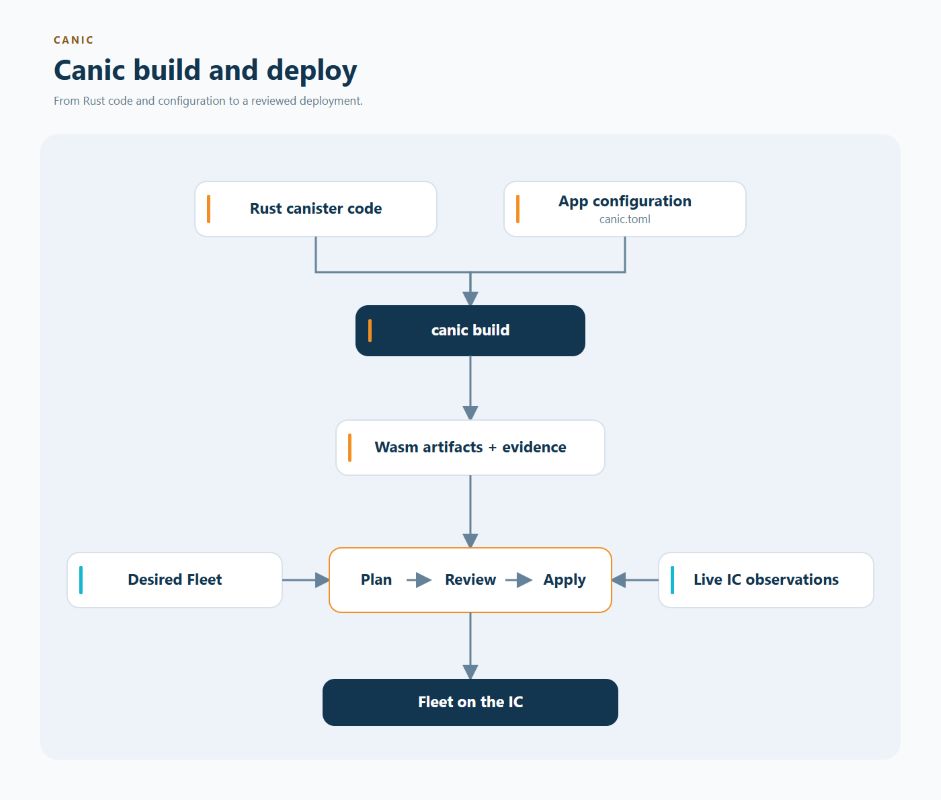
Operating a fleet of canisters by hand is fragile: deployments drift, topology lives in people's heads, and recovering from a bad upgrade is a scramble. Canic replaces that with repeatable, auditable workflows driven by metadata in your Cargo.toml and a single canic.toml configuration.

It pairs a Rust library — lifecycle and build macros, stable-memory helpers, endpoint guards — with an operator CLI that builds artifacts, installs fleets, captures snapshots, validates backup manifests, and drives guarded restore planning. Teams get the same deployment, every time, with evidence to prove it.

Capabilities

What Canic provides

01

Lifecycle & build macros

canic::start!() and canic::build! wire IC hooks, endpoint bundles, and compile-time config validation from package metadata.

02

Topology-aware config

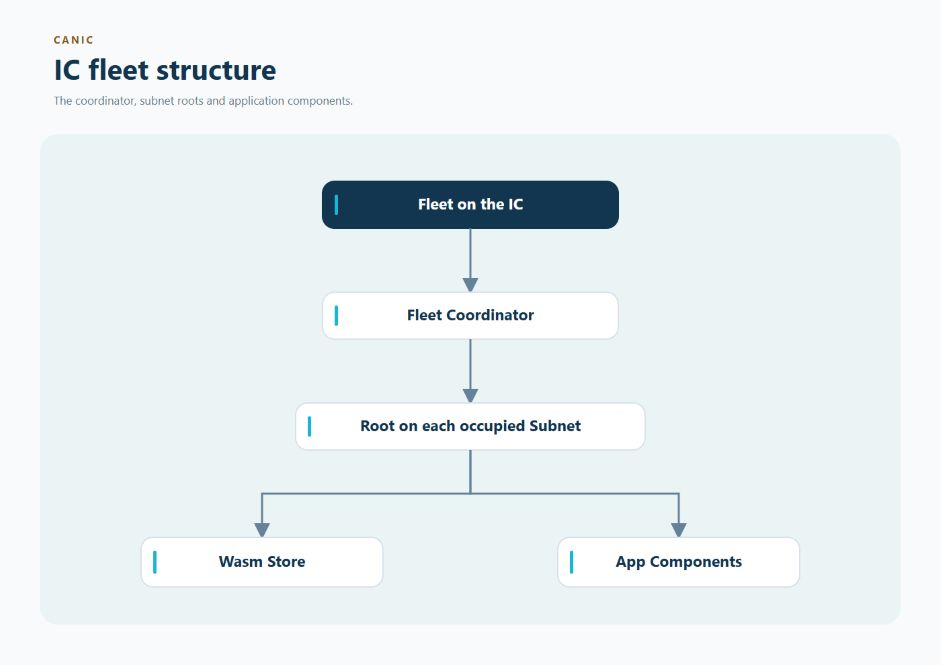
A validated canic.toml describes subnets, roles, and singleton, replica, shard, warm, scaling, and directory pools.

03

Thin-root install flow

The CLI stages child artifacts through an implicit wasm_store, keeping them out of the root Wasm for cleaner deployments.

04

Delegated authentication

Root signs shard certificates, shards mint user tokens, and verifiers validate tokens with local key material.

05

Snapshot, backup & restore

Capture topology-aware snapshots, validate backup manifests, and drive guarded restore planning from the operator CLI.

06

Evidence & adoption reports

Build provenance, deployment-check envelopes, policy gates, and read-only adoption profiles for existing deployments.

07

NNS & SNS inspection

Inspect subnet, node, operator, provider, and topology metadata from the NNS registry — and deployed SNS instances — through IC Query, the icq CLI Canic relies on for live IC metadata.

08

Role lifecycle

Declare ordinary managed canisters before topology placement, then explicitly attach them before artifact builds or deployment.

Get started

Install the operator binary

Install the published CLI alongside IC Query — Canic calls the icq binary for live IC metadata — then drive a local fleet through the standard loop: start a replica, install, inspect, and run health checks.

shell
# install the operator CLI
cargo install --locked canic-cli

# required: IC Query provides the icq metadata CLI
cargo install ic-query

# the short local loop
canic status
canic replica start --background
canic install --profile fast test
canic info list test
canic medic test

Who it's for

Built for teams running fleets

  • Teams operating multi-canister applications at scale
  • Frameworks and generated-canister systems
  • Projects that need repeatable, auditable deployments
  • Operators who need backup, restore, and recovery confidence

Project status

Canic is the successor to the internal ICU toolkit and is being opened for wider use. Published crates declare a minimum supported Rust version of 1.91. Issues and PRs are currently limited to the core team.

Requires IC Query: Canic depends on the icq CLI for NNS and SNS metadata lookups, so IC Query must be installed alongside it.

Deploy with confidence

Explore the full documentation, configuration reference, and operator walkthrough on GitHub.